uidai.gov.in is the official Website [Update]: Aadhaar card update online can be done via a simple log in at the UIDAI website uidai.gov.in. Aadhaar Card Update: When everything is getting digitised and KYC becoming mandatory after a certain period of time, either it’s your bank account or the online payment platforms like Paytm, One’s Aadhaar number is one of the most important documents that is going to play an important role in monetary and banking transactions. However, one must know that the mere submission of the Aadhaar card is not enough. It has to be completely updated through uidai.gov.in official website.
During the Aadhaar card update, it has been found that even after visiting the nearest Aadhaar card centre, one has to visit Aadhaar centre on the multiple numbers of times to check the Aadhaar card update. Once an Aadhaar Cardholder submits his or her request for an Aadhaar card update, there are only two ways to check the update — tracking the update request online UIDAI website uidai.gov.in or call the UIDAI toll free number 1947. One can send one’s query by a simple email at help@uidai.gov.in as well.
During Aadhaar card update corrections and changes can be made to Aadhaar card data under these two categories — Demographics and Biometrics. Demographics include name, address, date of birth, gender, mobile number and email while Biometrics includes fingerprints, iris scan, and photograph. Changes to address can be made online or offline, but changes to any other data have to be done at a permanent enrolment centre or nearest Aadhaar card centre.
If you have applied for the Adhaar card update only, you can check online through the card number.
- Why Does Retirement Feel Uncertain – Even with a Large Portfolio? Thoughts from Canadian Financial Planner & Blogger Ed Rempel
- How Stitch Quality Affects Shoe Lifespan and Performance
- Sustainable Threads for Eco-Friendly Footwear Production this Year
- Types of Business Loans Available in India
- In-store customization. How color-on-demand threads enable same-day personalisation
Here is the step by step guide to do the Aadhaar Card update check online:
Step 1: Log in at the UIDAI weblink ssup.uidai.gov.in/checkSSUPStatus/checkupdatestatus;
Step 2: Enter 12 digit Aadhaar card number;
Step 3: Fill captcha and click on submit;
Step 4: The next screen will show you whether the change has been made in the database or not.
However, there can be those people also who have applied for the Aadhaar card at Aadhaar card centre. They can also do the Aadhaar Card update check online in two ways — with EID, without EID.
If an individual has placed an Adhaar card update request at an Aadhaar card centre or Update Centre, then it will get an Enrolment ID (or EID) that helps in checking the Aadhaar Card update online. EID consists of 28 digits: the 14-digit enrolment number, and the 14-digit date & time stamp. It is located at the top of the update acknowledgement slip you get from the Enrolment or Update Centre after you have submitted your request for a change in Aadhaar details.
Aadhaar Card Update: Which number is linked in the Aadhar card? Learn and update like this – uidai.gov.in
Here is the step by step guide to check Aadhaar card update online:
Step 1:Log in at the UIDAI weblink resident.uidai.gov.in/check-aadhaar;
Step 2:Enter the EID and do a captcha/security verification;
Step 3:If your Aadhaar is ready, you will get a status message on the next screen, saying “Your Aadhaar is generated”. Download or get Aadhaar on your mobile from this screen itself; and
Step 4:If your Adhaar card update request is not added to the database then you will not get the above message.
One can check Aadhaar Card Update even when he or she doesn’t have the EID. One who doesn’t have the EID, can do the Aadhaar card update check online through the registered mobile number or email ID.
There are only four types of Aadhaar cards are valid, UIDAI also gave this advice – uidai.gov.in
>Know about Baal Aadhaar,How to apply Baal Aadhaar card online
Here is the step by step guide to do Aadhaar card update check online:
Step 1:Log in at the UIDAI weblink resident.uidai.gov.in/lost-uideid;
Step 2:Fill your full name, mobile number or email id, and enter the Captcha code;
Step 3:click on ‘Send OTP’;
Step 4:Log in using OTP;
Step 5:You will get your EID via SMS and email; and
Step 6:Proceed to the UIDAI My Aadhaar portal to check the status using the retrieved EID.
These documents will be needed to update Aadhaar Card, UIDAI released new list
More information on uidai.gov.in
An Indian citizen needs Aadhaar to take advantage of the welfare facilities provided by the government. Aadhaar is proof of one’s address and identity card. Aadhaar is a 12 digit number issued by the Unique Identification Authority of India (UIDAI). Anyone can go to Aadhaar center or bank / post office and enroll for Aadhaar by downloading the Aadhaar card using the enrollment ID, virtual ID or Aadhaar number given by UIDAI And can print. After the number is released, a person can download Aadhaar Card using several methods.
Download Aadhaar Card by Aadhaar Number
If you want to download and print Aadhaar card then you have to adopt the following method.
Step 1: Go to the official website of UIDAI https://uidai.gov.in/
Step 2: Select ‘Download Aadhar’ option or go to https://eaadhaar.uidai.gov.in/ this link
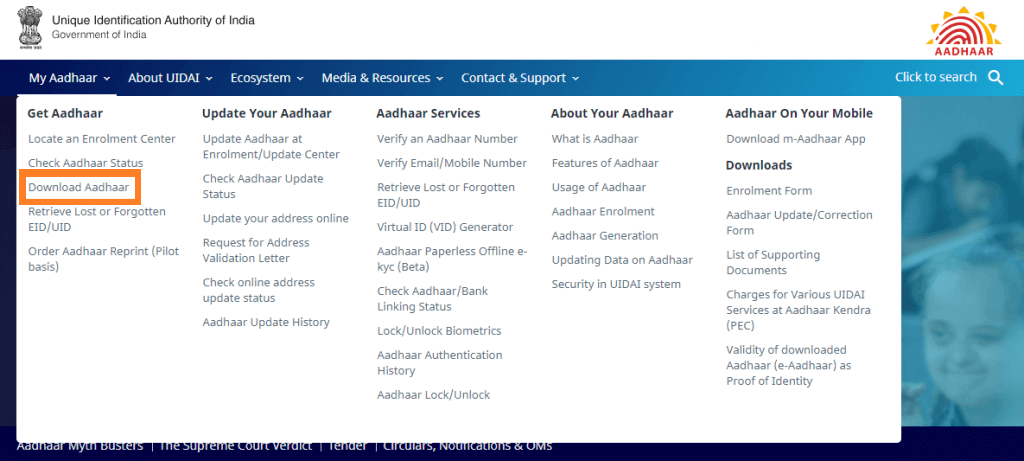
Step 3: Select ‘Aadhaar’ option from ‘I have’ section Enter the base number of
Step 4: 12 digit. If you do not want to show the Aadhaar number then select ‘Masked Aadhaar’
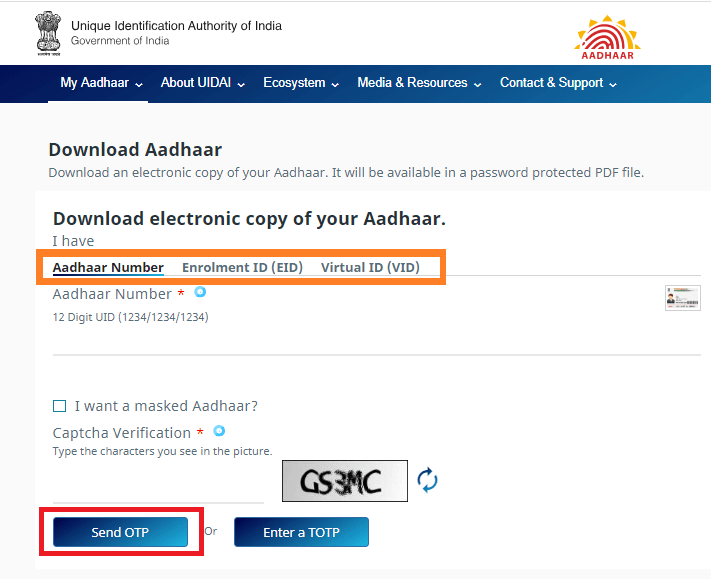
Aadhaar Card Update: Which number is linked in the Aadhar card? Learn and update like this – uidai.gov.in
Step 5: Enter captcha code and click on ‘Send OTP’ to get the OT on register mobile number
Step 6: Enter the OTP
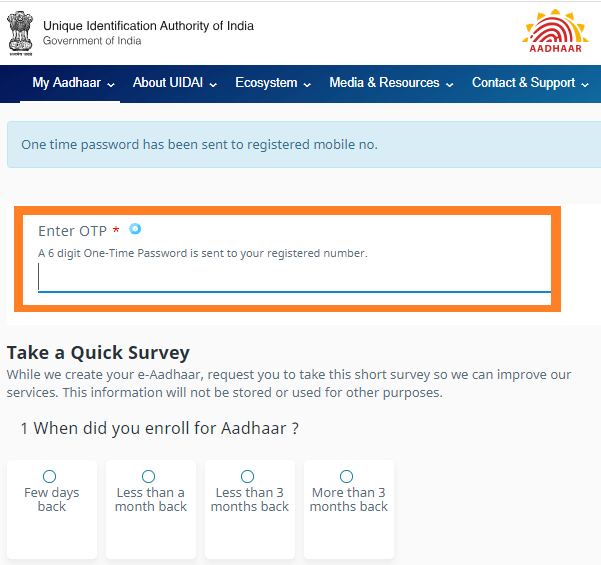
Step 7: Click on ‘Verify And Download’ to download the e-Aadhaar card
Steps to Download eAadhaar Card By Enrolment ID | uidai.gov.in
How to Mobile number updated in Aadhaar Card?
Aadhar Mobile Number Update: Many times, while making Aadhaar, we get the wrong mobile link or forget to get the mobile link, then there is no need to worry.
It is very important to have a mobile number link in the Aadhaar Card. There are many reasons behind this. If your Aadhar card has mobile numbers linked then the verification process becomes very easy, on the basis of which you can take advantage of various schemes of the government. Many times while making Aadhaar, we get the wrong mobile link or forget to get the mobile link, then there is no need to worry. Linking mobile number to Aadhaar is extremely easy. Let us first tell you how to check whether your Aadhaar mobile number is linked or not.
- First of all go to the website of UIDAI- www.uidai.gov.in
- Click on My Aadhaar
- Verify Email / Mobile Number in Aadhaar
- Now a new tab will open, enter your Aadhaar number on this page, then summit your mobile number or email ID whatever you want to check and verify.
- If the mobile number or email you entered matches with UIDAI’s data, then a message appears on your screen that your mobile number / Aadhaar is already verified. If not, you will be told that your mobile number does not match the record.
How will the mobile number be updated
To get a mobile link from Aadhaar, you have to go to the nearest Aadhaar center. Mobile number does not link to Aadhaar through online medium. The fee for updating the mobile number at Aadhaar center is Rs 50.
Aadhaar PVC Cards: Order online for new and attractive Aadhaar PVC cards in this way, know what are its benefits
Ordering a new and attractive Aadhaar PVC card is quite easy. You can order Aadhaar PVC card online for your entire family at home. The Unique Identification Authority of India (UIDAI) launched an entirely new Aadhaar card, printed on PVC cards, in October. The new Aadhaar PVC card is the same size as an ATM or debit card, so you can easily keep it in your purse. This new Aadhaar card is slightly smaller in size, so it can be easily kept in a purse.
You can order online for print Aadhaar card on PVC card by paying just Rs 50. A registered mobile number is not required to order an Aadhaar PVC card. You can order Aadhaar PVC card for the whole family from a single mobile number.
How to Apply Pvc Aadhaar Card Online Step by Step
1. This card comes with good PVC quality and lamination.
2. This card lasts for a long time and is easy to keep in the purse.
3. In this, offline verification is done instantly through QR code.
4. It also has an embossed base logo, which makes the card attractive.
5. Aadhaar PVC card also has security features like hologram, Guilloche pattern, Ghost Image and microtext.
This is how you can order PVC Aadhaar Card online
Step 1. You go to the official website of UIDAI.
Step 2. Now click on ‘Order Aadhaar PVC Card’ in ‘My Aadhaar Section’.
Step 3. Now you enter the 12 digit Aadhaar number or 16 digit virtual ID or 28 digit EID.
Step 4. Then enter the security code or captcha code shown in the picture.
Step 5. Now you click on Send OTP.
Step 6. Now you will get OTP on the registered mobile number.
Step 7. Now enter OTP and submit.
Step 8. For non registered mobile number you have to go to “My Mobile number is not registered” option. Now enter your non-registered or alternate mobile number. Then click on “Send OTP”.
Step 9. Now you will see the preview copy of the PVC card.
Step 10. Now click on the payment option and pay 50 rupees.
Step 11. With this your Aadhaar PVC Card will be ordered.
Get your children Aadhaar card made for free, learn how
Aadhaar card has become a very important document in today’s time. Aadhaar is sought for admission of children in schools. Forms for nursery admission are issued around December every year.
Aadhaar card has become a very important document in today’s time. Aadhaar is sought for admission of children in schools. Forms for nursery admission are issued around December every year. There is a need for Aadhaar at the time of admission form. In order to ensure that parents do not get into trouble at that time, we are giving you information about how to get the Aadhaar card made free of cost for the children. The method of preparing the Aadhaar Card for children is also similar to that of elders. Parents will have to accompany the child to their nearest Aadhaar Care Center and fill a form there.
For Baal under 5 years old
Children’s Aadhaar Card is also called Child Aadhaar Card. Aadhaar card can also be made for a new born baby. In such a situation, if your child is less than 5 years old, then for this you will need the birth certificate of the child. But if you do not have a birth certificate, then in such a situation, the Aadhar card of the parents can also work. No biometric data is taken from the child until the age of five years because the child’s biometric does not develop until 5 years. But when his age is more than 5 years, biometric records have to be updated.
For Children over 5 years old
If your child is over 5 years of age then his / her biometric data is taken. It carries fingerprints and eye scans. After this, the biometric data has to be updated when the child is 15 years of age, which has become necessary now.
How to Apply Baal Aadhaar Card?
To get your child’s Aadhaar card, you have to go to the nearest Aadhaar Seva Kendra or Post Office. You will have to fill the enrollment form and submit it. Also, all the necessary documents have to be submitted. After this, you will be given the enrollment ID, number and date on the enrollment slip. After this, with the help of this enrollment ID you can check online about Aadhaar status and download it from there.
Why is it important for children Aadhaar Card
- proof of identification
- To open a bank account
- To get subsidy given by the government
- Documents required to make Aadhaar card of children
- Aadhar card of the child’s parents
- Child’s birth certificate
- Identity card of the child’s parents
- Any certificate of address of the child’s parents
Aadhaar card can be used incorrectly, before giving photo copy to anyone, do this work:
According to UIDAI, after stealing the identity of a person from the Aadhaar number, no case of financial loss has come to light so far.
If you have given a photo copy of your Aadhaar card to someone, then there is a possibility that your Aadhaar card may be misused. Account can not be opened in any bank only with photo copy of Aadhaar card or original Aadhaar card. To open a bank account, you have to go through the whole process. Not only this, verification also has to be completed. Let me tell you that even if someone uses the copy of your Aadhaar card to open an account, it will be considered as the fault of the bank, the Aadhar card holder will not have to answer.
We need to provide a photo copy of our Aadhaar card for many purposes . Here let me tell you that if you are giving a photo copy of your Aadhaar card to someone, then cross it as a check. This is because if someone wants to use it wrongly through fraud, then the Aadhar card will not be able to do because of the cross.
Avoid sharing personal information with anyone
If the fear of bank or any other type of fraud is causing you trouble, then the easiest way to avoid it is to never share your personal information with an unknown person. Banks often warn their customers about this. Those who accidentally share their personal information such as credit card, debit card number, OTP, password or PIN with someone, are more likely to be fraudulent.
Is it wrong to use Aadhaar
According to UIDAI, after stealing the identity of a person from the Aadhaar number, no case of financial loss has come to light so far. Every day, on the Aadhaar platform, about 30 million Aadhaar numbers are certified for various services.
UIDAI advice
UIDAI forbids people to share Aadhaar numbers on social media. Actually misuse of Aadhaar is not possible, but it is not right to unnecessarily share your information on social media, because the fraudsters can harm you in any way.
Have you forgotten the link mobile number with Aadhaar Card, find out in a pinch
If you use more than one mobile number and you do not remember which mobile number is registered with Aadhaar, then you can find out in minutes by visiting UIDAI website.
Nowadays Aadhaar card has become the most important document to provide proof of your identity and citizenship. The requirement of Aadhaar card is now falling almost everywhere. Aadhar is now mandatory for any government scheme or subsidy ranging from bank, income tax, mobile wallet, UPI. Most of the work related to our life is incomplete without it. From opening an account in the bank to making a gas connection and passport, it is needed in many things. Apart from this, work is incomplete without Aadhaar in government schemes . From time to time, we have to get the Aadhar card updated, which requires OTP. Nowadays, everyone has at least two mobile numbers in common, so it is very difficult to remember which mobile number is linked with Aadhaar Card.
Visit UIDAI website
If you use more than one mobile number and you do not remember which mobile number is registered with Aadhaar, then you can find out in minutes by visiting UIDAI website.
This is the process of Check Aadhar Card Link Mobile No
- For this, you must first go to uidai.gov.in
- Now here you have to go to Aadhaar Services, click on Verify Email / Mobile Number Verification Option
- Here you have to fill the necessary information
- Then enter the mobile number and security code
- To know which mobile number is linked to Aadhaar, first enter your Aadhaar number
- After that you can cross check it by entering the manual number
- Enter the numbers you think may be linked
- After doing this, the mobile number entered will be linked to your Aadhaar, then an OTP will come on that email or mobile number
- Now you have to enter this OTP and verify
Online appointment of Aadhhar Card Updates
You can also get information about your registered number by visiting the Aadhaar center. However, for this you will have to take your appointment. You can easily do this by visiting the UIDAI website to get a time book. For this you have to visit the official website of UIDAI uidai.gov.in. On the home page of the UIDAI website, you will see the My Aadhaar icon. Click on it. Click on Book an Appointment in Get Aadhaar here.
Update your mobile number in Aadhhar Card without documents
According to UIDAI, if you have not yet updated the mobile number in Aadhaar, then you can update it without any document. That is, you do not need any kind of documents to update the mobile number in the Aadhaar card.
How to update mobile number in Aadhar card
Have to go to Aadhaar Enrollment / Update Center. There you will have to fill the Aadhar card update form. Fill in the number form you want to update the mobile number. Then you have to provide your biometrics. The employee will give you a receipt which contains an update request number (URN). Aadhaar updation status can be tracked using URN. To update the mobile number, you have to pay 50 rupees.
Apart from this, by calling UADAI’s toll-free number 1947, you can also call for any Aadhaar update or any questions related to Aadhaar.
Aadhaar Card Update: Name, address or age to be updated in Aadhaar Card? Know which documents will be required
Aadhaar Card Update: There can be many types of mistakes in Aadhaar. Many times in Aadhaar card, mistakes are made in spelling of name, death of birth, address and mobile number. Not only government schemes but many times these mistakes can spoil your work while getting your own money back or buying a property.
The Aadhaar Card has become an important factor in the life of every Indian today. Today, the Aadhaar card is used in almost everything. From buying a house to getting a driving license or a PAN card, the Aadhar card has become very important for the benefit of any government scheme. But a slight mistake in Aadhaar can derail your intention of taking advantage of any scheme. In such a situation, if there is any mistake in your Aadhaar card, get it rectified as soon as possible.
There can be many types of mistakes in Aadhaar. Many times in Aadhaar card, mistakes are made in spelling of name, death of birth, address and mobile number. Not only government schemes but many times these mistakes can spoil your work while getting your own money back or buying a property. Let us tell you which document is needed to get the name, address or date of birth corrected in the Aadhaar card.
Let us tell you that for updating the name, address, date of birth, gender, mobile number or email ID in Aadhaar card, a fee of Rs 50 has to be paid.
Which documents does UIDAI accept?
UIDAI accepts 32 documents on an identity card. It is necessary to have the correct name and photo of the candidate. These are the major documents.
- Passport Passport
- PAN Card PAN Card
- Ration Card Ration / PDS Photo Card
- Voter ID Voter ID
- Driving License Driving License
- Government Photo ID Cards Government Photo ID Cards / Service photo identity card issued by PSU
- NREGA Job Card NREGS Job Card
- Photo ID issued by Government Educational Institution Photo ID issued by Recognized Educational Institution
- Arms License Arms License
- Photo Bank ATM Card Photo Bank ATM Card
- Photo Credit Card Photo Credit Card
- Pension Photo Card Pensioner Photo Card
- Freedom Fighter Photo Card Freedom Fighter Photo Card
- Kisan Photo Passbook Kissan Photo Passbook
- CGHS / ECHS Photo Card / CGHS / ECHS Photo Card
- Address card issued by the post department with name and address on the address card having name and photo issued by department of posts
- See the complete list of documents here – https://ssup.uidai.gov.in/ssup/#listofdocument
What documents are accepted UIDAI as address proof
UIDAI has issued a list of 45 documents on acceptance as address proof, of which we have given you information about 19 of them. It is jururi to know the name of the candidate on the address proof.
- Passport Passport
- Bank Statement / Passbook Bank Statement / Passbook
- Post Office Passbook Post Office Account Statement / Passbook
- Ration Card Ration Card
- Voter ID Voter ID
- DL Driving License
- Government photo ID issued by PSU Government photo ID cards / service photo identity card issued by PSU
- Electricity bill Electricity bill (not older than 3 months)
- Water Bill Water Bill (not older than 3 months)
- Landline Telephone Bill Telephone Landline Bill (not older than 3 months)
- Property Tax Receipt Property Tax Receipt (not older than 1 year)
- Credit Card Statement Credit Card Statement (not older than 3 months)
- Insurance Policy Insurance Policy
- NREGA Job Card NREGS Job Card
- Arms License Arms License
- Pensioner Card Pensioner Card
- Freedom Fighter Card Freedom Fighter Card
- Farmer Passbook Kissan Passbook
- CGHS / ECHS Card CGHS / ECHS Card
- See the complete list of documents here – https://ssup.uidai.gov.in/ssup/#listofdocument
Documents accepted UIDAI as date of birth
UIDAI accepts 15 certificates to update the date of birth. We are giving information about 5 of these to you.
- Birth Certificate Birth Certificate
- SSLC Book SSLC Book / Certificate
- Passport Passport
- Photo ID card issued by educational institution, including date of birth
- Pan Card
- See the complete list of documents here – https://ssup.uidai.gov.in/ssup/#listofdocument
What can be done online in Aadhaar?
- Name Name
- Date of Birth
- Gender gender
- Address Address
- Language
For Head of Family, Guardian details or biometric updates, you have to visit the Aadhaar Seva Kendra.
How often can Aadhaar be updated?
- Name: Life twice
- Sex – once in life
- Date of birth – once in life
Updating the address on Aadhaar is very easy, mAadhaar App will work quickly
UIDAI Aadhaar (Aadhaar) holders can also avail many facilities through digital medium. mAadhaar App can be downloaded with Google Play on Android through the App Store of ios.
Aadhaar is a very important document. The Aadhaar card is issued by the Unique Identification Authority of India (UIDAI). It contains all the information of the cardholder. Aadhaar also contains biometric and demographic records. There is no need to visit the shops for any complaint or amendment related to Aadhaar.
Using the mAadhaar App,
UIDAI Aadhaar card holders can also avail many facilities through digital medium. For this, you have to use the Aadhaar Mobile Application (mAadhaar App).
Features of mAadhaar App
1. You can download Aadhaar for mAadhaar App.
2. You can check the status of Aadhaar.
3. Can order for Aadhaar reprint.
4. You can find the base center.
5. Address Updation.
6. Offline e-KYC download.
7. Scan QR Code.
8. Verification basis.
9. Base locking, biometric locking / unlocking.
10. OTP Generation.
11. Profile updates.
12. QR Code Sharing.
If there is any change in Aadhaar, then get an appointment in this way for free
The Aadhaar card is an important document for every Indian citizen. Aadhar card is not only a document, but an identity card. Aadhaar is a must for availing any financial transactions and government schemes. Whether to create a new Aadhaar card or update the name, address, date of birth, e-mail ID, gender or biometric in Aadhaar. Now you don’t have to spend hours in long lines. The Unique Identification Authority of India (UIDAI), the Aadhaar issuing organization, allows you to take online appointments for free. That is, you can take an appointment to update Aadhaar at Aadhaar service centers at home.
Here’s how to get an UIDIA (Aadhar Card Update) appointment
To get an online appointment, you must first go to the website of UIDIA https://uidai.gov.in/ .
After visiting the website, you have to click on the ‘My Aadhaar’ tab, after which you will get an option of Book n appointment.
After visiting this, you will get another option of city location, from which you have to select the city.
After selecting the city, click on ‘Processed to book an appointment’.
Now a new page will open in front of you, which will have three options – New Aadhaar, Aadhaar Update and Manage Appointment. You can choose any of these options as per your requirement.
After choosing the appropriate option, you will have to enter the registered mobile number, captcha code and OTP, after which your application will be verified. During this time you also have to choose a time slot for the appointment. After doing all this, submit it.
Explain that the booking process is completely free.
UIDAI has started Aadhaar Seva Kendras in many places including Delhi, Chennai, Bhopal, Agra, Hisar, Vijayawada and Chandigarh.
FAQ’s Of Aadhaar Card (uidai.gov.in)
Q. I have stopped using old mobile number and email, it was not updated by Aadhaar Card Center. How do I download my Aadhaar Card?
Answer: In such a situation, you cannot download your Aadhaar card. You have to go to the Aadhaar Enrollment Center with the new number and update your mobile number. Alternatively, you can use your biometrics to download your Aadhaar number.
Q. Which app can I use to download my e-Aadhaar?
Answer. You can download your Aadhaar on your smartphone in the mAadhaar app. Up to 3 profiles can be added to the m-Aadhaar app.
Q. How many ways to download e-Aadhaar?
Answer. You can download your e-Aadhaar from UIDAI website or install the mAadhaar app on your smartphone. It should always be kept in mind that you do not fall into the trap of any wrong website in the matter of downloading your Aadhaar card.
Q. I do not remember Aadhaar number, how can I download my Aadhaar with the help of my mobile number?
Answer: You can find your Aadhaar online on the UIDAI website. Once you put all your information there, your Aadhaar number will be sent to your registered mobile number.
Q. If my mobile number is not registered with UIDAI, can I download my Aadhaar online?
Answer: If you have not registered your mobile number with your Aadhaar, then you cannot download your Aadhaar online.
Q. Can I download a masked Aadhaar in Digi Locker?
Answer: You cannot download a masked Aadhaar in any app. This facility is available only on UIDAI website.
Q. Can I download Aadhaar card using Virtual ID?
Answer: You can download Aadhaar card by virtual ID using online UIDAI portal.
Q. I have updated my information in my base. Do I need to download Aadhaar again?
Answer: When you download your Aadhaar, the information you update will appear in it. When you update your information in Aadhaar, you will have to download Aadhaar with updated information in your DG locker too.
Q. My original base is lost, can I download Aadhaar and use it at the airport?
Answer: You can download Aadhaar from UIDAI website and print it. That print copy can be used instead of the original base. Apart from this, you can create an account in DG Locker and download your Aadhaar in it. This Aadhaar can be used as an identity card for entry into the airport.
Frequently Asked Questions on Uidai.gov.in
- What is e-Aadhaar?
e-Aadhaar is a password protected electronic copy of Aadhaar, which is digitally signed by the competent Authority of UIDAI.
- Is e-Aadhaar equally valid like physical copy of Aadhaar?As per Aadhaar Act, e-Aadhaar is equally valid like Physical Copy of Aadhaar for all purposes. For UIDAI circular on validity of e Aadhaar, please visit https://uidai.gov.in/images/uidai_om_on_e_aadhaar_validity.pdf
- What Is the Password of e-Aadhaar?Combination of the first 4 letters of name in CAPITAL and the year of birth (YYYY) as password.For Example:Example 1
Name: Raj KUMAR
Year of Birth: 1991
Password: Raj1991Example 2
Name: Sanjay Kumar
Year of Birth: 1991
Password: SANJ1991Example 3
Name: Rathi KUMAR
Year of Birth: 1992
Password: RATHI1992Example 4
Name: Amit
Year of Birth: 1993
Password: AMIT1993 - How can Resident download e-Aadhaar?Resident can download e-Aadhaar by following two ways.
- By Using Enrollment Number: Resident can download e-Aadhaar using 28 digit enrolment no. along with Full Name and Pin code. In this download process OTP is received on registered mobile no. Resident can also use TOTP to download e-Aadhaar instead of OTP. TOTP can generated using mAadhaar mobile Application.
- By Using Aadhaar No: Resident can download e-Aadhaar by using 12 digits Aadhaar No. along with Full Name and Pin code. In this download process OTP is received on registered mobile no. Resident can also use TOTP to download e-Aadhaar instead of OTP. TOTP can generated using mAadhaar mobile Application.
How to download Aadhar card from Aadhaar number? – eaadhar.uidai.gov in
You can easily download the Aadhaar card with the Aadhaar number. For this, all you have to do is visit the Unique Identification Authority of India (UIDAI) website. Downloading a copy of Aadhaar card is very easy like a PAN card or voter id. Not only this, digital copy of Aadhaar card is also as valid as its Aadhaar letter. Although the Aadhaar card can be downloaded in many ways, but today we will talk about how to download it from the Aadhaar number or Aadhaar number.
When any person applies for an Aadhaar card, he is given an eclipse slip containing his reference details. In this slip, the nomination number and time stamp are given with the name, address of the person. On the basis of which he can get his e-Aadhaar card from EID or UID.
Let’s know how to download Aadhaar card from Aadhaar number
- Go to the website of the cardholder https://eAadhar.uidai.gov.in/.
- Whatever you have on the basis of EID or UID, you choose the option
- After that enter enrollment number / Aadhaar number
- Enter the twelve (12) digit Aadhaar number.
- Enter your full name as written in the Aadhaar card.
- Enter the PIN code number you gave while making Aadhaar card
- Then enter what you gave your mobile number.
- Enter the number of image captcha code in the box below it.
- Click on get one time password button. OTP will come to your mobile number after some time of clicking.
- Enter OTP on mobile number and click on download
- Aadhaar card will be downloaded in PDF form.
- The person’s computer must have Adobe Reader
- To open the file, one has to enter his name in capital letters or enter his birth year password in YYYY format.
- After opening the Aadhaar card, a person can download their Aadhaar card. Also know that even if you do not print Aadhaar card, its e-copy will be considered as valid proof. So if your Aadhaar card is lost, then its e-copy will be considered valid.
Advantages of linking Aadhar card with Bank account.
Know in this easy way whether your Aadhaar is linked to the bank account or not? It is very important to link a bank account with Aadhaar. Money received under pension, LPG subsidy or government schemes comes directly into the bank account. If you want to take advantage of this, then your bank account must be linked to Aadhaar.
Recently, the central government had ordered all banks to link all accounts with Aadhaar. Since then, the practice of linking Aadhaar to a bank account has intensified. Now the question is whether your bank is linked to account base or not. We are telling you how you can find out whether your account is linked to Aadhaar or not while sitting at home. Let’s know.
It is very important to link a bank account with Aadhaar. Money received under pension, LPG subsidy or government schemes comes directly into the bank account. If you want to take advantage of this, then your bank account must be linked to Aadhaar.
Find out if the bank account is linked to Aadhaar
For this, first you have to go to the website uidai.gov.in.
Now go to the check Aadhaar & Bank Account Linking Status on the section titled ‘Aadhaar Services’.
Clicking on the Check Aadhaar & Bank Account Linking Status link, a new page will open here Aadhaar number with 12 numbers will be asked.
Now enter your Aadhaar number. After this, the security code will appear.
After inserting the secret code, OTP will come on your registered mobile. Enter OTP and login.
If the bank account is linked to Aadhaar, then you will see this message – Congratulations! Your Bank Aadhaar Mapping has been done.
Thanks For Visiting this website any doubt you can comment below, you want to latest updates this type of useful information just follow on Google News.